arrow_forward

JENTIS vs. Google Tag Manager

JENTIS is the managed, independent alternative to server-side Google Tag Manager and server-side GTM, with more complete data and no servers to run yourself.

Book a demo

Where the two setups differ in practice

Three areas that decide how much data reaches your tools.

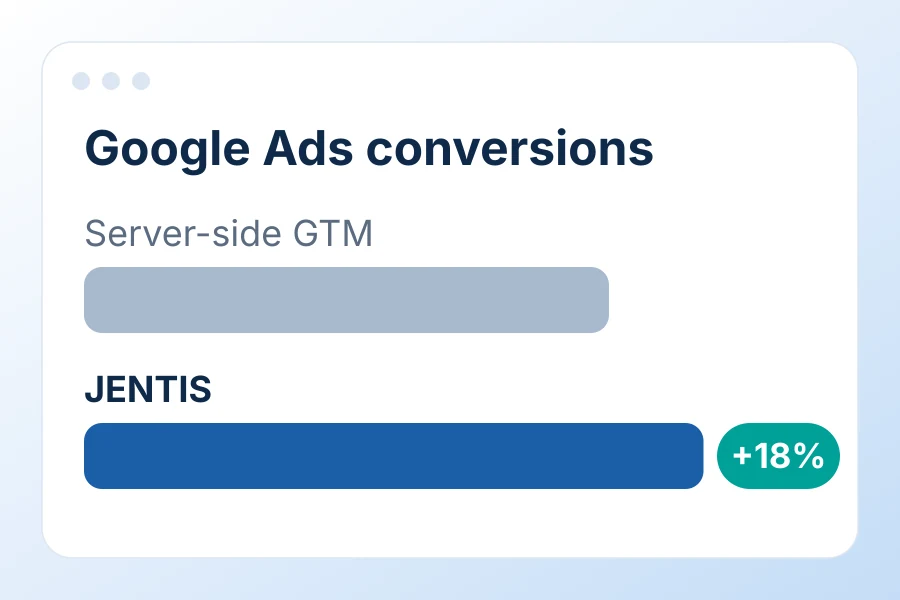
Google Ads conversions: JENTIS 18% higher than server-side GTM in a side-by-side test

Conversions reaching your ad platforms

JENTIS is blocked less often than GTM and adds signals for consent-declined sessions. Tested in parallel with server-side GTM: 18% more Google Ads conversions.

Google Tag Manager

GTM runs from a browser container. When an ad blocker stops it, every tag behind it stops too.

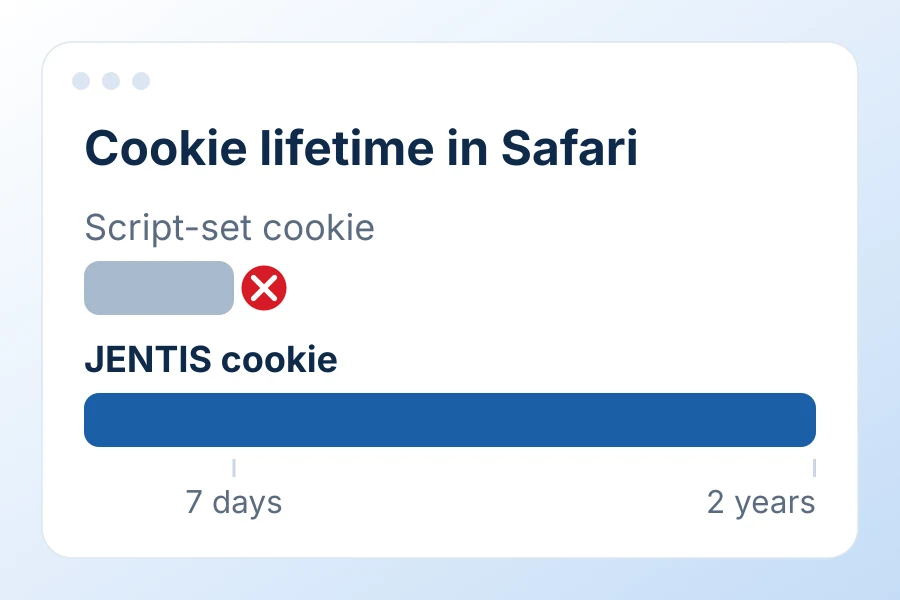
Cookie lifetime in Safari: 7 days for script-set cookies, up to 2 years for JENTIS cookies

Attribution

Cookies set from your own domain last up to two years in Safari, so returning visitors keep one ID in every tool.

Google Tag Manager

Safari deletes script-set cookies after 7 days, and sGTM cookies get the same cap unless the server shares your site's IP.

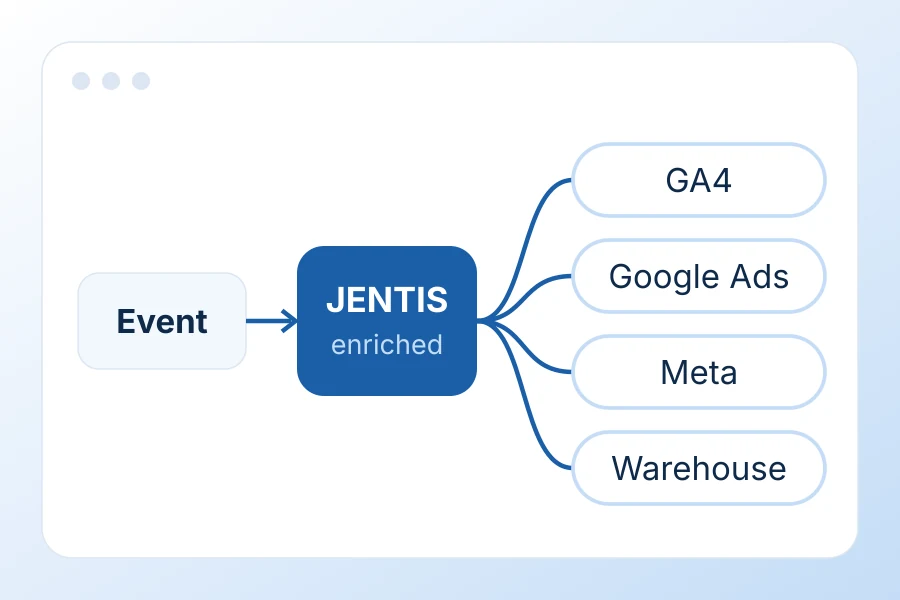
One event captured by JENTIS, enriched and sent to GA4, Google Ads, Meta and your warehouse

Raw data in your own warehouse

Each event is captured once, enriched on the server and sent to every tool. Raw data goes to the warehouse you choose.

Google Tag Manager

With sGTM, raw data export, enrichment and logging depend on Google Cloud.

JENTIS and Google Tag Manager, feature by feature

Google Tag Manager + sGTM
Architecture & data collection
How data reaches your tools
Patented Twin Server technology mirrors the browser on the server. Native connectors built on it rely less on vendor APIs and are less affected when an API changes.
Server-side tags for non-Google tools send data through each vendor's API, often via community templates, so delivery depends on each API and its changes.
Client- and server-side tags in one container
check
do_not_disturb_on
info

JENTIS hosts, monitors, scales and updates the tracking infrastructure. With server-side GTM, your team or a hosting provider runs the tagging server.

check
do_not_disturb_on
Built-in ad blocker recovery
check
do_not_disturb_on
Long-lived first-party cookies for all connected tools
check
do_not_disturb_on
Conversion signals from consent-declined sessions for all ad platforms
check
do_not_disturb_on
Tag & event management
Vendor-maintained connectors for non-Google tools
check
do_not_disturb_on
Built-in raw data export to your own warehouse
check
do_not_disturb_on
Works with your existing Google data layer
check
check
Versioning and rollback
check
check
Shared configuration and publishing across multiple websites
check
do_not_disturb_on
Tag failure monitoring with email alerts
check
do_not_disturb_on
Independent of ad and analytics platforms
check
do_not_disturb_on
Moving to server-side tracking
The Data Layer Bridge reads your existing data layer. Migration assistants and services take complex setups live in days.
A second container and a tagging server to host, with tags rebuilt for the server side.
Privacy & compliance
Vendor headquartered in the EU
check
do_not_disturb_on
EU hosting included, on a European cloud provider
check
do_not_disturb_on
Consent enforced on the server without per-tag setup
check
do_not_disturb_on
Consent-free baseline measurement for all connected tools
check
do_not_disturb_on
Platform-independent privacy-enhancing technology
check
do_not_disturb_on
Privacy by design
Developed to privacy-by-design standards, as set out in Article 25 GDPR and in the guidelines of the EU's data protection authorities.
Privacy settings are configured tag by tag, so what is collected and forwarded depends on your setup.
Vendor business model and regulatory record
Independent EU vendor. Its business is data collection software, not advertising, and it has no history of rulings by EU data protection authorities.
Google's main business is advertising. Several EU data protection authorities ruled in 2022 that using Google Analytics breached the GDPR.
Commercial & operations
Support backed by an SLA
check
do_not_disturb_on
Onboarding and migration services from the vendor
check
do_not_disturb_on
Total cost
Subscription that includes hosting, maintenance, connectors and support.
Tagging server hosting on Google Cloud, plus the internal or agency time to run two containers, roll changes out to each one and maintain community templates.

Leading brands maximize their marketing ROI with JENTIS.

With server-side tracking from JENTIS, we can now optimally combine data value creation with data protection.
Olaf-Peter Poenisch
CEO
JENTIS for Finance
east
I recommend JENTIS to all brands looking for ways to boost performance on marketing channels.
Nadine Bleck
Regional E-Commerce Manager EMEA
Read case study
east
We now have a tracking solution that allows us to send data to Meta while ensuring data privacy at the same time.
Horst Hamberger
Deputy Head of Engineering
JENTIS for Publishers
east
At Playmobil, we understand customer journeys better and address target groups more effectively with JENTIS.
Yashar Nategh
SVP Global CX & E-Commerce
Read case study
east

From GTM to JENTIS in days

JENTIS reads your existing Google data layer, so it stays as it is. Migration assistants and the JENTIS services team take care of the move.

counter_1

Step 1 Connect your data layer

Add the JENTIS snippet and route tracking through your own domain with a DNS A record. The Data Layer Bridge reads the events your Google data layer already sends.

counter_2

Step 2 Move your tags

Migration assistants and the JENTIS services team rebuild your GTM tags in JENTIS, using native connectors for GA4, Google Ads, Meta and your other tools.

counter_3

Step 3 Run in parallel, then switch

Run JENTIS alongside GTM, compare the numbers in your existing reports and switch when they match. Consent rules come from your CMP through the CMP Bridge.